
You can setup detailed performance monitoring for HTTPs and ODATA calls to show this information in ST03 workload monitoring.
Setup
Run program SWNC_CONFIG_URL and change the settings:
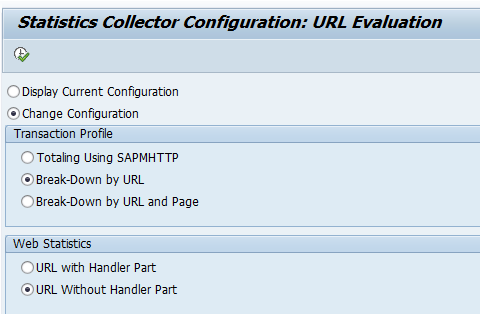
Background OSS note: 2093522 – ST03 Profiles do not show full information (compressed data). This note also warns that for very large volume there might be issues with the data collection. Solution for that issue is explained in OSS note 2059569 – Runtime error EXPORT_TOO_MUCH_DATA when saving statistic data aggregates.
With report SWNC_CONFIG_PATH you can reduce the path in the recording. See also OSS notes 2285159 – ST03n: Normalization of background job names and URLs in VC/WM profiles and 3070839 – MON-TUN: Extension of length and starting Position for the Normalization of URLs. By doing this, you get more aggregation and also less issues: 3297874 – How to improve the performance of transaction ST03/ST03N on systems with high http(s) workload.
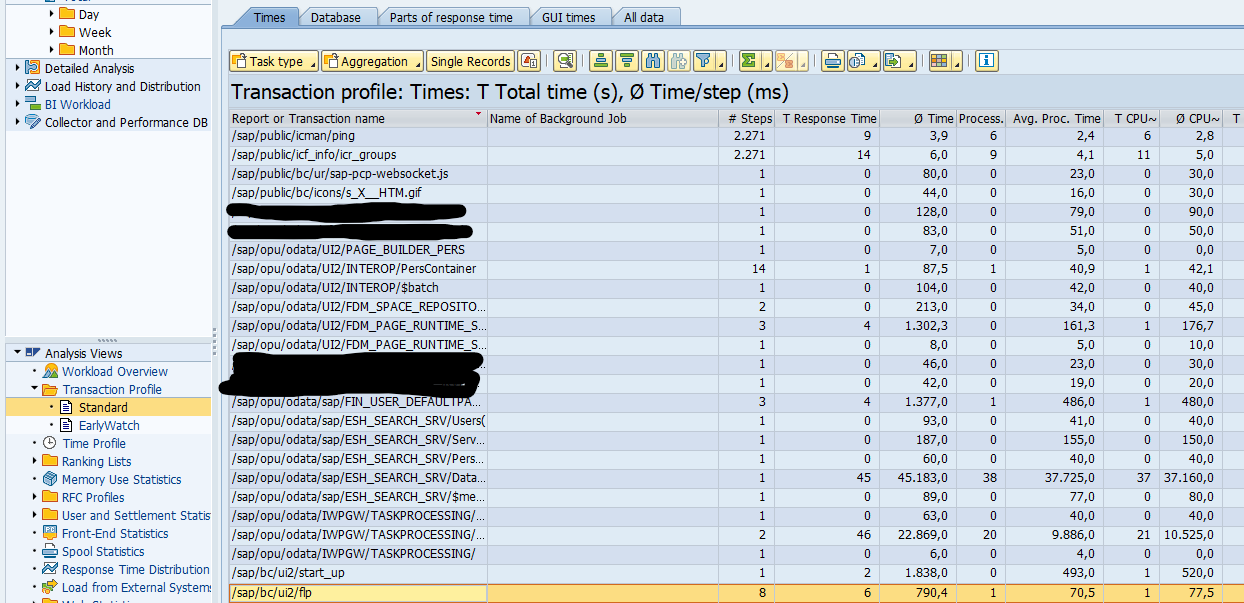
Result in ST03
In ST03 you can now see the results in the part for transaction profile standard overview:
Good background SAP blog: reference.