With the coding below you can use a file to upload data into any Z table. The program below first deletes the full content first, then upload the content from the file. If you want different behavior, you can adjust the program to your own needs.
The program is to be protected with a proper authorization check. And it is for utility support only for non-productive systems. Do not use on productive systems.
Be careful: the program first deletes ALL the content of the current table. Then it inserts the entries from the file.
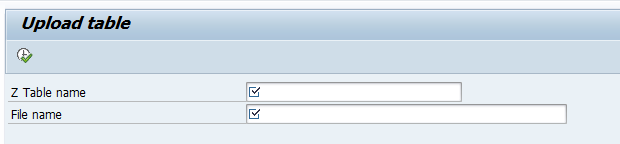
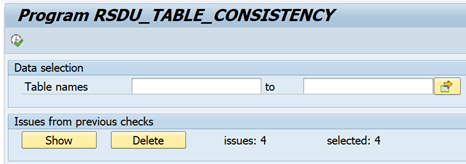
Program selection screen:
Coding:
*&--------------------------------------------------------------------* *& Report Z_UPLOAD_TABLE *&--------------------------------------------------------------------* *& Description: Upload the data from a file and fill a Z table *&--------------------------------------------------------------------*
REPORT z_upload_table.
PARAMETERS: p_table TYPE dd02l-tabname OBLIGATORY, p_file TYPE ibipparms-path OBLIGATORY.
DATA: lt_file_data TYPE STANDARD TABLE OF string, lt_table_data TYPE REF TO data, lt_fieldcat TYPE lvc_t_fcat, lt_component TYPE abap_component_tab, lv_separator TYPE c LENGTH 1 VALUE ','. DATA: lv_offset TYPE i VALUE 0, lv_until TYPE i VALUE 0, lv_field TYPE string. DATA: lv_filename TYPE string.
FIELD-SYMBOLS: <lt_table_data> TYPE STANDARD TABLE, <ls_table_data> TYPE any, <lv_field> TYPE any.
DATA: new_line TYPE REF TO data.
AT SELECTION-SCREEN. DATA: l_got_state TYPE ddgotstate. * Validate table name CALL FUNCTION 'DDIF_TABL_GET' EXPORTING name = p_table IMPORTING gotstate = l_got_state EXCEPTIONS OTHERS = 1. IF l_got_state <> 'A'. MESSAGE 'Table does not exist' TYPE 'E'. ENDIF. IF p_table+0(1) <> 'Z' AND p_table+0(1) <> 'Y'. MESSAGE 'Please use only Z or Y tables.' TYPE 'E'. ENDIF.
*----------------------------------------------------------------------* * AT SELECTION-SCREEN ON VALUE-REQUEST *----------------------------------------------------------------------* AT SELECTION-SCREEN ON VALUE-REQUEST FOR p_file.
CALL FUNCTION 'F4_FILENAME' IMPORTING file_name = p_file.
START-OF-SELECTION.
* Dynamically create internal table CREATE DATA lt_table_data TYPE TABLE OF (p_table). ASSIGN lt_table_data->* TO <lt_table_data>.
CREATE DATA new_line LIKE LINE OF <lt_table_data>. ASSIGN new_line->* TO <ls_table_data>.
* Generate field catalog for the table CALL FUNCTION 'LVC_FIELDCATALOG_MERGE' EXPORTING i_structure_name = p_table CHANGING ct_fieldcat = lt_fieldcat EXCEPTIONS OTHERS = 1. IF sy-subrc <> 0. MESSAGE 'Error generating field catalog' TYPE 'E'. ENDIF.
* Delete all entries from the target table DELETE FROM (p_table). IF sy-subrc = 0. MESSAGE 'All entries deleted from table' TYPE 'I'. ENDIF.
* Parse and insert data into the table
DESCRIBE TABLE lt_file_data LINES DATA(lv_idx). DELETE lt_file_data INDEX lv_idx.
LOOP AT lt_file_data INTO DATA(ls_line) FROM 4. CLEAR <ls_table_data>.
LOOP AT lt_fieldcat ASSIGNING FIELD-SYMBOL(<fs_fieldcat>). IF <fs_fieldcat>-fieldname = 'MANDT'. ASSIGN COMPONENT <fs_fieldcat>-fieldname OF STRUCTURE <ls_table_data> TO <lv_field>. IF sy-subrc = 0. <lv_field> = sy-mandt. ENDIF. ELSE. CLEAR lv_offset. DO strlen( ls_line ) TIMES. DATA(lv_index) = sy-index.
DATA(lv_single) = substring( val = ls_line off = lv_index - 1 len = 1 ). IF lv_index = 1 AND lv_single = '|'. lv_offset = lv_offset + 1. ELSEIF lv_single = '|'. "New field lv_until = lv_index - lv_offset - 1. lv_field = ls_line+lv_offset(lv_until). lv_offset = lv_offset + lv_until + 1.
ASSIGN COMPONENT <fs_fieldcat>-fieldname OF STRUCTURE <ls_table_data> TO <lv_field>. IF sy-subrc = 0. <lv_field> = lv_field. ENDIF. ls_line = ls_line+lv_offset. EXIT. ENDIF. ENDDO. ENDIF. ENDLOOP.
APPEND <ls_table_data> TO <lt_table_data>.
ENDLOOP.
* Insert data into the database table INSERT (p_table) FROM TABLE <lt_table_data>. IF sy-subrc = 0. MESSAGE 'Data successfully inserted into table' TYPE 'S'. ELSE. MESSAGE 'Error inserting data into table' TYPE 'E'. ENDIF.
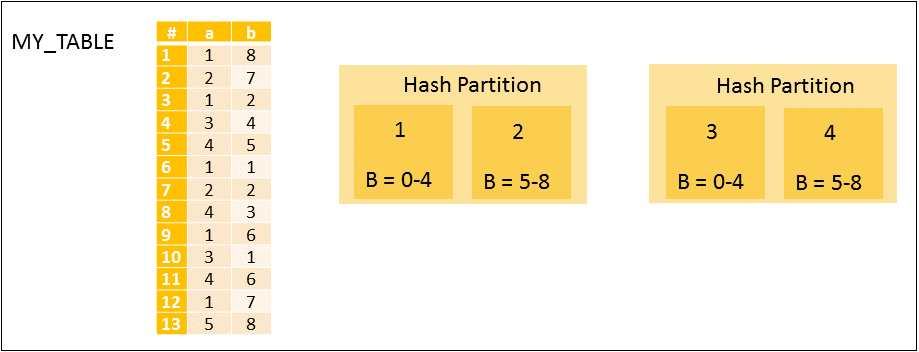
The partitioning feature of the SAP HANA database splits column-store tables horizontally into disjunctive sub-tables or partitions. In this way, large tables can be broken down into smaller, more manageable parts.
Partitioning is only available for tables located in the column store. The row store does not support partitioning.
BW systems are handled separately, please refer to chapter “BW Systems”.
1.1 Reasons and background of partitioning
Following are some of the reasons, next to the advantages described later, to perform partitioning:
In SAP HANA, a non-partitioned column store tables can’t store more than 2 billion rows.
Memory requirements are doubled at the time of the table optimization.
There is an increased risk of locking issues during table optimization.
The CPU consumption can be significant, particularly during optimize compression runs.
The I/O write load for savepoints is significant and can lead to trouble like a long critical phase (SAP Note 2100009 – FAQ: SAP HANA Savepoints)
SAP HANA NSE: Range partitions with old data can be offloaded easier.
Therefore you should avoid using particularly large tables and partitions and consider a more granular partitioning instead. A reasonable size threshold is typically 50 GB, so it can be useful to use a more granular partitioning in case this limit is exceeded.
1.2 Best Practices
The following best practices should be kept in mind:
Keep the number of partitioned tables low
Keep the number of partitions per table low (maximum 8 partitions)
Maximum 100 – 200 million rows per partition (recommended).
Define partitioning on as few columns as possible
For SAP Suite on HANA, keep all partitions on same host
Repartitioning rules: When repartitioning, choose the new number of partitions as a multiple or divider of current number of partitions.
Avoid unique constraints
Throughput time: 10-100 G/hour
HASH partitioning on a selective column being part of the primary key; check which sorting option is used mostly.
1.3 Advantages
These are some advantages of partitioning:
Load Balancing: In a distributed system. Individual partition can be distributed across multiple Hosts.
Record count: Storing more than 2 billion rows in a table.
Parallelization: Operations can be parallelized by using several execution threads.
Partition Pruning: Queries are analyzed to see if they match the given partitioning specification of a table (STATIC) or the content of specific columns in aging tables (DYNAMIC). Remark: When a table is range partitioned based on MONTH and in the WHERE clause YEAR is selected, all partitions are scanned and not only the 12 partitions belonging to the year.
Delta merge performance: Only changed partitions must be duplicated in the RAM, instead of the entire table.
1.4 Partitioning Types
The following partioning types can be used, but normally only HASH and RANGE are used:
HASH: Distribute rows to partitions equally for load balancing and to overcome the 2 billion row limitation.
ROUND-ROBIN: Achieve an equal distribution of rows to partitions.
RANGE: Dedicated partitions for certain values or value ranges in a table.
Multi-level (HASH/RANGE) First partition on level 1, than on level 2.
1.5 Parameters
The following optional parameters can be set to optimize HANA partitioning, if required.
Inifile
Section
Parameter
Value
Remark
indexserver.ini
joins
single_thread_execution_for_partitioned_tables
false
Allow parallelization
indexserver.ini
partitioning
split_threads
<number>
Parallelization number for repartitioning; 80 % of max_concurrency
indexserver.ini
table_consistency_check
check_repartitioning_consistency
true
Implicit consistency check
SQL commands:
ALTER SYSTEM ALTER CONFIGURATION ('indexserver.ini','SYSTEM') SET ('joins',' single_thread_execution_for_partitioned_tables') = 'false' WITH RECONFIGURE; ALTER SYSTEM ALTER CONFIGURATION ('indexserver.ini','SYSTEM') SET ('partitioning','split_threads') = '<number>' WITH RECONFIGURE; ALTER SYSTEM ALTER CONFIGURATION ('indexserver.ini','SYSTEM') SET ('table_consistency_check','check_repartitioning_consistency') = 'true' WITH RECONFIGURE;
1.6 Privileges
The following privileges should be granted to the user executing the partitioning:
System privilege: PARTITION_ADMIN
For the user examining the partitioning, the following privilege might also be of interest:
Whenever a table is queried and if that table or partition is not present in memory HANA automatically loads it into the memory either partially or fully.
If that table is partitioned, which ever row that is getting queried, then that specific partition which has the required data gets into memory.
Even if you only need 1 row from a partition of a table which has 1 billion records, that entire partition will get loaded either partially or fully.
In HANA we can never load 1 row alone into memory from a table.
2. Determine candidates
Check which tables are larger than 50G or have more than 1 billion records:
select a.table_name, (select string_agg(column_name,', ') from index_columns where constraint = 'PRIMARY KEY' and table_name = a.table_name group by table_name) "Primary Key Columns", case a.is_partitioned when 'TRUE' then (select LEVEL_1_TYPE || '(' || replace(LEVEL_1_EXPRESSION,'"','') || ')#' || LEVEL_1_COUNT from partitioned_tables where table_name = a.table_name) else 'No' end as "Current Partitioning", a.record_count "Rows", to_decimal(a.table_size/1024/1024/1024,2,2) "Size GB" from m_tables a where a.IS_COLUMN_TABLE = 'TRUE' and (a.record_count > 1000000000 or a.table_size/1024/1024/1024 > 50) order by a.table_name;
The output will display:
TABLE_NAME: Name of the table
Primary Key Columns: The columns on which the primary key is created
Current Partitioning: If the table is currently partitioned and the partition type, columns and number of partitions
Rows: Number of records in the table
Size GB: Size of the table in memory
3. Determine Partitioning Strategy
In order to choose an appropriate column for partitioning we need to analyze the table usage in depth.
3.1 Technical Tables
3.1.1 With recommendations
In case you can find exact partitioning recommendation on a specific table please follow the recommendation. Check SAP Note 2044468 – FAQ: SAP HANA Partitioning to find the latest information. Here only the most common tables are listed.
Use column with best value distribution and use same column for both tables if possible, in some cases OBJECTID for CDHDR and CHANGENR for CDPOS can be the best solution
CKMLCR, CKMLKEPH
HASH
KALNR
COBK, COEP
HASH
BELNR
COFV
HASH
CRID
DBTABLOG
HASH
LOGID
EDID4, EDIDS
HASH
DOCNUM
EQKT
HASH
EQUNR
IDOCREL
HASH
ROLE_A or ROLE_B
The column with better value distribution
JCDS, JEST
HASH
OBJNR
JVTLFZUO
HASH
VBELN
KEPH
HASH
KALNR
KONV
HASH
KNUMV
MATDOC
HASH
MBLNR
MBEW, MBEWH, MVER, MYMFT
HASH
MATNR
MSEG
HASH
MBLNR
PCL2, PCL4
HASH
SRTFD
RESB
HASH
RSNUM
RSEG
HASH
BELNR
SOC3
HASH
SRTFD
SRRELROLES
HASH
OBJKEY
STXL
HASH
TDNAME
SWWCNTP0, SWWLOGHIST
HASH
WI_ID
VBFA
HASH
SoH: VBELV S/4HANA: RUUID
3.1.2 Without recommendations
If there is no specific recommendation for partitioning a table by SAP (e.g. because this is not listed (2044468 FAQ: SAP HANA Partitioning) or the table is a customer specific table) please follow the approach as described in chapter “3.3 Other tables”.
If data volume is not significantly above 1 billion records per year
RANGE
RBUKRS
Only if there is a reasonable data distribution by company code and the expected data volume of the largest company code is not significantly above 1 billion records
Ask them which column(s) they query frequently and which column is always part of the where clause .
If they are not very clear on the same we can help them with the plan cache data.
3.3.2 Check M_SQL_PLAN_CACHE
With the help of below query we can get a list of queries that are to identify the where clause:
select top 10 upper(SUBSTR_AFTER(STATEMENT_STRING, 'WHERE')), EXECUTION_COUNT, TOTAL_EXECUTION_TIME from M_SQL_PLAN_CACHE where STATEMENT_STRING like '%TABLE%' and not STATEMENT_STRING like 'select upper(SUBSTR_AFTER(STATEMENT_STRING%' and not upper(SUBSTR_AFTER(STATEMENT_STRING, 'WHERE')) like '' and not upper(SUBSTR_AFTER(STATEMENT_STRING, 'WHERE')) like '%UNION%' and TOTAL_EXECUTION_TIME > 0 and EXECUTION_COUNT > 5 order by TOTAL_EXECUTION_TIME desc;
From the result you have to analyze the where clause and find a common pattern.
Let’s assume that table CDPOS is accessed mostly via MANDT and CHANGENR (This is by the way the case in many SAP customer systems), the solution would be to implement range-range multi-level partitioning for column MANDT (level 1) and column CHANGENR (level 2).
For sure some SQL statements will have to look into several partitions of one MANDT when CHANGENR is not used in the where-clause.
3.3.3 Join Statistics
Check the columns that are getting joined on this table. Use SQL script HANA_SQL_Statistics_JoinStatistics_1.00.120+ from OSS note 1969700 – SQL Statement Collection for SAP HANA and modify the SQL like below.
From the output, you can determine on which column joins are happening most and hence a HASH on this column will make the query runtime faster.
3.3.4 Enable SQL Trace
Enable SQL trace for specific table.
3.3.5 No specific range values
When there is no specific range values that are frequently queried and there is a case like most of the columns are used most of the times, a HASH algorithm will be a best fit.
It is similar to round robin partition, but data will be distributed according to the hash algorithm on their one or two designated primary key columns:
A Hash algorithm can only happen on a PRIMARY key field.
Do NOT choose more than 2 primary key field for HASH
Within the primary key, check for which row has maximum distinct records. That specific column can be chosen for re-partition.
To determine which primary key column can be chosen for re-partitioning, perform below steps.
Load the table fully into memory: LOAD TABLE ALL;
Select the Primary Key columns and the distinct records per column: select a.column_name, sum(b.distinct_count) from index_columns a, m_cs_columns b where a.table_name = 'TABLE' and a.constraint = 'PRIMARY KEY' and a.table_name = b.table_name and a.column_name = b.column_name group by a.column_name order by sum(b.distinct_count) desc;
3.3.6 NSE-based partitioning
Check if there is a column with a date-like format in the primary key. It might be a candidate for NSE based partitioning.
select distinct a.COLUMN_NAME, a.DATA_TYPE_NAME, a.LENGTH, a.DEFAULT_VALUE from TABLE_COLUMNS a, INDEX_COLUMNS b where a.TABLE_NAME = b.TABLE_NAME and a.COLUMN_NAME = b.COLUMN_NAME and replace(a.DEFAULT_VALUE,'0','') = '' and length(a.DEFAULT_VALUE) >= 4 and not a.DEFAULT_VALUE = '' and a.LENGTH between 4 and 14 and b.CONSTRAINT = 'PRIMARY KEY' and a.TABLE_NAME = 'TABLE';
This query only gives an indication. To be sure, query the table itself.
Run the following query and execute the output as the schema owner:
select 'select top 5 ' || string_agg(COLUMN_NAME,', ') || ' from ' || TABLE_NAME || ';' from INDEX_COLUMNS where CONSTRAINT = 'PRIMARY KEY' and TABLE_NAME = 'TABLE' group by TABLE_NAME
Output looks like:
select top 5 MANDT, KALNR, BDATJ, POPER, UNTPER from CKMLPP;
Execute the output-query and the result looks like:
In this case column LOGDATA contains a date format, but we need to convert this to the YEAR. This can be done by dividing LOGDATA by 10000 (from 8 characters to 4 character).
4. Determine Partitions
4.1 Ranges
In case of RANGE partitioning, to get an indication of the number of partitions and the number of rows per partition, execute the queries as mentioned in below chapters, depending on the column value that can be used.
Eventually some partition ranges can be combined.
The ranges (start and end), the number of records and the estimated size per partition will be displayed.
Note: these queries should be executed by the SAP Schema user!
4.1.2 Range on part of column
When a part of column can be used, the value has to be divided by the number of characters you want to remove.
This is the case when you want to use the YEAR from a string that contains YEAR, MONTH, DAY and TIME.
Note: Edit the query with the correct TABLE, with the chosen COLUMN and if required change the divider number. For example, if you want to remove 4 characters from the column, devide by 10000 (1 with 4 zeroes).
Example:
From 8 to 4 characters: divide by 10000 (4 zeroes)
From 8 to 6 characters: divide by 100 (2 zeroes)
Query:
select "Start", "End", "Rows", to_decimal("Est_Size_Gb"*"Rows"/1024/1024/1024,2,2) "Est_Size_GB" from (select to_decimal(COLUMN/RANGE,1,0)*RANGE "Start", to_decimal(COLUMN/RANGE,1,0)*RANGE+RANGE "End", count(*) "Rows", (select table_size/record_count from m_tables where table_name = 'TABLE') "Est_Size_Gb" from TABLE group by to_decimal(COLUMN/RANGE,1,0)*RANGE order by to_decimal(COLUMN/RANGE,1,0)*RANGE);
4.1.2 Range on entire column
The entire column value can be used as a partition.
This is the case when you want to use the YEAR from a string that equals the YEAR.
Query:
select "Start", "Rows", to_decimal("Est_Size_Gb"*"Rows"/1024/1024/1024,2,2) "Est_Size_GB" from (select COLUMN "Start", count(*) "Rows", (select table_size/record_count from m_tables where table_name = 'TABLE') "Est_Size_Gb" from TABLE group by COLUMNorder by COLUMN);
4.2 Determine number of partitions
In case of HASH partitioning, the number of partitions has to be determined.
A good sizing method is:
Keep the number of partitions per table low (maximum 8 partitions)
Maximum 100 – 200 million rows per partition (recommended).
This can be done with the following command.
The number of partitions can be determined with the following query, based on the number of records in the table, divided by 100 million (when too many partitions (> 8), divide by a higher value) or the size of the table in GB devided by 50:
select to_decimal(round(RECORD_COUNT/100000000,0,round_up),1,0) PART_ON_ROWS, to_decimal(round(table_size/1024/1024/1024/50,0,round_up),1,0) PART_ON_SIZE from m_tables where TABLE_NAME = 'TABLE';
5 Implementation
5.1 SQL Commands
The following commands can be used to perform the actual partitioning of tables:
Action
SQL Command
HASH Partitioning
ALTER TABLE TABLE PARTITION BY HASH (COLUMN) PARTITIONS X;
ROUND-ROBIN Partitioning
ALTER TABLE TABLE PARTITION ROUNDROBIN X;
RANGE Partitioning On part of column
ALTER TABLE TABLE PARTITION BY RANGE (COLUMN) (PARTITION 0 <= VALUES < 1000, PARTITION XXX <= VALUES < YYY, PARTITION OTHERS);
RANGE Partitioning On full column
ALTER TABLE TABLE PARTITION BY RANGE (COLUMN)(PARTITION VALUE = 1000, PARTITION VALUE = 2000, …, PARTITION OTHERS);
Multi-level (HASH/RANGE) Partitioning
ALTER TABLE TABLE PARTITION BY HASH (COLUMN1) PARTITIONS X, RANGE (COLUMN2) (PARTITION 0 <= VALUES < 1000, PARTITION XXX <= VALUES < YYY, PARTITION OTHERS);
Move partitions to other servers
ALTER TABLE TABLE MOVE PARTITION X TO 'server_name:3nn03' PHYSICAL;
Add new RANGE to existing partioned table On part of column
ALTER TABLE TABLE ADD PARTITION XXX <= VALUE < YYY;
Add new RANGE to existing partioned table On full column
ALTER TABLE TABLE ADD PARTITION VALUE = YYY;
Drop existing RANGE
ALTER TABLE TABLE DROP PARTITION XXX <= VALUE < YYY;
Adjust partitioning type
ALTER TABLE TABLE PARTITION …
Delete partitioning
ALTER TABLE TABLE MERGE PARTITIONS;
5.2 Automatic new partitions
There is an automatic way to add new partitions besides dynamic range partitioning by record threshold. Starting with SPS06 there is a new interval option for range partitions.
When a new dynamic partition is required, SAP HANA renames the existing OTHER partition appropriately and creates a new empty partition.
Thus, no data needs to be moved and the process of dynamically adding a partition is very quick.
With this feature you can use the following parameters to automatize the split of the dynamic partition based on the number of records.
Inifile
Section
Parameter
Default
Unit
Remark
indexserver.ini
partitioning
dynamic_range_default_threshold
10000000
rows
automatic split once reached row threshold
Indexserver.ini
partitioning
dynamic_range_check_time_interval_sec
900
sec
how often the threshold check is performed
Note: These threshold can be changed to meet the requirements. It can also be set per table, with: ALTER TABLE T PARTITION OTHERS DYNAMIC THRESHOLD 500000;
The partitioning columns need to be dates or numbers. Dynamic interval is only supported when the partition column type is TINYINT, SMALLINT, INT, BIGINT, DATE, SECONDDATE or LONGDATE. If no <interval_type> is specified, INT is used implicitly.
To check the DATA_TYPE of the selected column, execute the following query:
select COLUMN_NAME, DATA_TYPE_NAME, LENGTH from TABLE_COLUMNS where TABLE_NAME = 'TABLE' and COLUMN_NAME = 'COLUMN';
Examples:
Action
SQL Command
Quarterly new partition
ALTER TABLE TABLE PARTITION OTHERS DYNAMIC INTERVAL 3 MONTH;
Half yearly new partition
ALTER TABLE TABLE PARTITION OTHERS DYNAMIC INTERVAL 6 MONTH;
After 2 years new partition
ALTER TABLE TABLE PARTITION OTHERS DYNAMIC INTERVAL 2 YEAR;
5.3 Check Progress
To check the overall progress of a running partitioning execution, run the following query:
select 'Overall Progress: ' || to_decimal(sum(CURRENT_PROGRESS)/sum(MAX_PROGRESS)*100,2,2) || '%' from M_JOB_PROGRESS where JOB_NAME = 'Re-partitioning' and OBJECT_NAME like 'TABLE%';
To check the progress in more detail, run:
select TO_NVARCHAR(START_TIME,'YYYY-MM-DD HH24:MI:SS') START_TIME, to_decimal(CURRENT_PROGRESS/MAX_PROGRESS*100,3,2) || '%' "PROGRESS%", OBJECT_NAME, PROGRESS_DETAIL from M_JOB_PROGRESS where JOB_NAME = 'Re-partitioning' and OBJECT_NAME like 'TABLE%';
6 Aftercare
6.1 HASH Partitioning
For HASH Partitioning, regularly check the number of records per partition and consider repartitioning.
When repartitioning, choose the new number of partitions as a multiple or divider of current number of partitions.
6.2 RANGE Partitioning
For tables with RANGE partitioning, new partitions should be created regularly, when a new range is reached.
Old partitions which are not required anymore, can be dropped.
Next to that, checks need to be performed that not too many rows reside in the OTHERS partition.
To review if new partitions should be added to existing partitioned tables and if records are present in the “OTHERS” partition, execute the following query:
select a.table_name, replace(b.LEVEL_1_EXPRESSION,'"','') "Column", b.LEVEL_1_COUNT "Partitions", max(c.LEVEL_1_RANGE_MIN_VALUE) "Last_Range_From", CASE max(c.LEVEL_1_RANGE_MAX_VALUE) WHEN max(c.LEVEL_1_RANGE_MIN_VALUE) THEN 'N/A' ELSE max(c.LEVEL_1_RANGE_MAX_VALUE) END "Last_Range_To", (select record_count from m_cs_tables where part_id = b.LEVEL_1_COUNT and table_name = a.table_name) "Rows in OTHERS" from m_tables a, partitioned_tables b, table_partitions c where a.IS_COLUMN_TABLE = 'TRUE' and a.is_partitioned = 'TRUE' and b.level_1_type = 'RANGE' and a.table_name = b.table_name and b.table_name = c.table_name and b.LEVEL_1_COUNT > 1 group by a.table_name, b.LEVEL_1_EXPRESSION, b.LEVEL_1_COUNT order by a.table_name;
When the “Last_Range_To” column is a date-like column and the date-like partition is already or almost past, add a new partition.
For the tables that have non-zero values in column “Rows in OTHERS”, run the following check to determine the reason why they are in others and if extra partitions should be added.
Note: Edit the query with the correct TABLE and COLUMN and if required change the divider number. For example, if you want to remove 4 characters from the column, devide by 10000 (1 with 4 zeroes).
Example:
From 8 to 4 characters: divide by 10000 (4 zeroes)
From 8 to 6 characters: divide by 100 (2 zeroes)
select a."Start", a."End", case when b.part_id is not null then to_char(b.part_id) else 'OTHERS' end "Partition" from (select to_decimal(COLUMM/RANGE,1,0)*RANGE"Start", to_decimal(COLUMM/RANGE,1,0)*RANGE+RANGE "End" from TABLE group by to_decimal(COLUMM/RANGE,1,0)*RANGE order by to_decimal(COLUMM/RANGE,1,0)*RANGE) a left outer join (select part_id, case when level_1_range_min_value <> '' then to_decimal(level_1_range_min_value,1,0) else '0' end "Start", case when level_1_range_max_value <> '' then to_decimal(level_1_range_max_value,1,0) else '0' end "End" from table_partitions where table_name = 'TABLE') b on a."Start" >= b."Start" and a."Start" < b."End";
All these actions can be done with the commands as specified in chapter “5.1 SQL Commands”.
6.3 Partitioning Consistency Check and Repair
Once partitioning has been implemented, some consistency checks can and should be performed regularly.
To ensure consistency for partitioned tables, execute checks and repair statements, if required.
You can call general and data consistency checks for partitioned tables to check, for example, that the partition specification, metadata, and topology are correct.
If any of the tests encounter an issue with a table, the statement returns a row with details on the error. If the result set is empty (no rows returned), no issues were detected.
6.3.2 General check
Checks the consistency among partition specification, metadata and topology:
The number of first level partitions depends on number of records in the largest table of the table group respectively the TABLE_PLACEMENT configuration.
In all SAP BW on SAP HANA systems (single node and scale-out) maintain the table placement rules and the required SAP HANA parameters as follows and explained below.
Scale-out with 1 Index server coordinator + 1 active index server worker node
Scale-out with 1 Index server coordinator + 2 active index server worker nodes
Scale-out with 1 Index server coordinator + 3 or more active index server worker nodes
For systems up to and including 2 TB per node
010 = Single node (up to and including 2 TB)
020 = Scale-out (up to and including 2 TB per node) with 1 coordinator and 1 worker node
030 = Scale-out (up to and including 2 TB per node) with 1 coordinator and 2 worker nodes
040 = Scale-out (up to and including 2 TB per node) with 1 coordinator and 3 or more worker nodes
For systems with more than 2 TB per node
050 = Single node (more than 2 TB)
060 = Scale-out (more than 2 TB per node) with 1 coordinator and 1 worker node
070 = Scale-out (more than 2 TB per node) with 1 coordinator and 2 worker nodes
080 = Scale-out (more than 2 TB per node) with 1 coordinator and 3 or more worker nodes
Notes:
Scale-out configurations with less than two active index server worker nodes are not recommended. If the scale-out system uses <= 2 TB per node. See SAP Note 1702409 for details.
InfoCubes and classic/advanced DataStore Objects in scale-out systems are distributed over all nodes – including the coordinator – if the nodes are provided with more than 2 TB main memory. This optimizes memory usage of all nodes – including the coordinator. If this frequently leads to situations with excessively high CPU load on the coordinator, certain BW objects must be distributed to other nodes to reduce the CPU load.
With SAP HANA 1.0 SPS 12 and SAP HANA 2.0, a table for a BW object can have more partitions at the first level than there are valid locations (hosts) for this table, but only if the main memory of the nodes exceeds 2 TB. This is achieved by setting the parameter ‘max_partitions_limited_by_locations’ to ‘false’. The maximum number of partitions at the first level is limited by the parameter ‘max_partitions’. Its value is set depending on the number of hosts. Some operations in HANA use parallel processing on partition level. If there are more partitions, it is ensured that the CPU resources on larger HANA servers are used more efficiently. If this frequently leads to situations with excessively high CPU load on some or all HANA nodes, it may be necessary to manually adjust the partitioning rules (for some BW objects) to reduce the CPU load. In this context ‘manually’ means that a customer defined range partitioning at the second level must be adjusted, or additional, BW object-specific table placement rules must be created. Please note that manual changes to the partitioning specification of BW-managed tables at database level (via SQL statements) are not supported.
In scale-out systems with 1.5 or 2 TB per nodeand efficient BW housekeeping, the memory usage on the coordinator may be low because InfoCubes and DataStore Objects are not distributed across all nodes (as is the case for systems with more than 2 TB per node). In this scenario, it is not supported to use the rules for table placement for systems with more than 2 TB per node. Instead, you can check the option of identifying DataStore Objects (advanced)that are used as corporate memory, on which therefore little or no reporting takes place, and placing these objects on the coordinator node. This may be a workaround to make better use of the main memory on the coordinator node without causing a significant increase in the CPU load on the coordinator. DataStore objects (advanced) can be placed on the coordinator node with the aid of object-specific rules for table placement. These customer-specific rules for table placement must be reversed if this causes an overly high memory or CPU load on the coordinator node.
Prerequisites:
only for scale-out systems with 1.5 or 2 TB per node
only for DataStore Objects (advanced) not for classic DataStore Objects (due to the different partitioning specifications)
only for DataStore Objects (advanced) that are used as corporate memory i.e. DataStore Objects (advanced) without activation
sizing rules as documented in the attachment ‘advanced DataStore objects type corporate memory on coordinator node.sql’ must be respected
7.1.2 Maintain scale-out parameters
In SAP BW on SAP HANA scale-outsystems only, maintain the parameters recommended in SAP Note 1958216 for the SAP HANA SPS you use.
In an SAP HANA scale-out system, tables and table partitions are assigned to an indexserver on a particular host when they are created. As the system evolves over time you may need to optimize the location of tables and partitions by running automatic table redistribution.
Different applications require different configuration settings for table redistribution.
For systems running SAP BW on SAP HANA or SAP BW/4HANA – SAP HANA 2.0 SPS 04 and higher:
ALTER SYSTEM ALTER CONFIGURATION ('indexserver.ini','SYSTEM') SET ('table_redist','balance_by_execution_count') = 'false' WITH RECONFIGURE COMMENT 'See SAP Note 1958216';
7.1.3 Check Table Classification
Make sure that all BW tables have the correct table classification.
For an existing SAP BW on SAP HANA system, you can check the table classification using the report RSDU_TABLE_CONSISTENCY and correct it if necessary. For information about executing the report, see SAP Note 1937062.
This note provides a file “rsdu_table_consistency_<version>.pdf”.
The report does not available on BW4/HANA systems. Please check the note 2668225 – Report RSDU_TABLE_CONSISTENCY is deprecated with SAP BW/4HANA.
Follow the instructions from the latest pdf file.
During the migration of an SAP BW system via SWPM, the report SMIGR_CREATE_DDL ensures that the correct table classification is set. Before using one of the two reports, implement the current version of the SAP Notes listed in the to SAP Note 1908075 attached file REQUIRED_CORRECTION_NOTES.XLSX. Filter the list in accordance with your release and Support Package, and implement the notes in the specified sequence using transaction SNOTE.
In a heterogeneous system migration using the Software Provisioning Manager (SWPM), you also have to implement these SAP Notes in the source system before you run the report SMIGR_CREATE_DDL. If you perform the migration using the Database Migration Option (DMO), you do not have to implement the SAP Notes in the source system. Instead, you should implement the SAP Notes in the target system or include a transport with those SAP Notes when the DMO prompts you to do so.
The operation of the report is strongly divided into two parts: Check and Repair, which can’t be combined in a single run!
7.1.3.1 Check tables for inconsistencies
The check for inconsistencies is pure read-only for both HANA and BW.
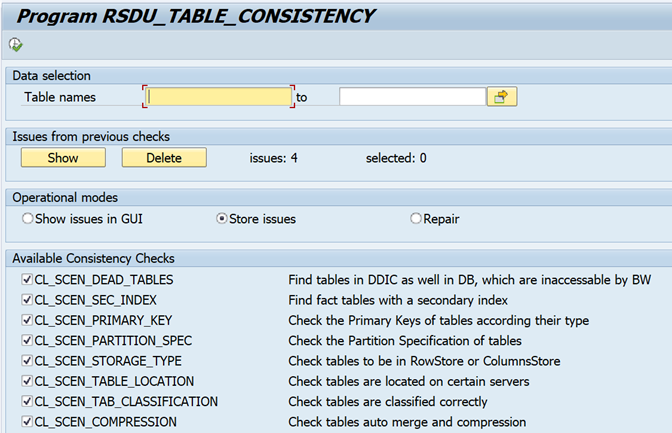
In Tx SE38, run report RSDU_TABLE_CONSISTENCY.
Select “Store issues” and select all checkboxes:
Run the report.
7.1.3.2 Display table consistencies
When you run the report with “Show issues in GUI”, the issues will be displayed.
When you run the report with “Store issues”, the issues will be displayed when executing in foreground.
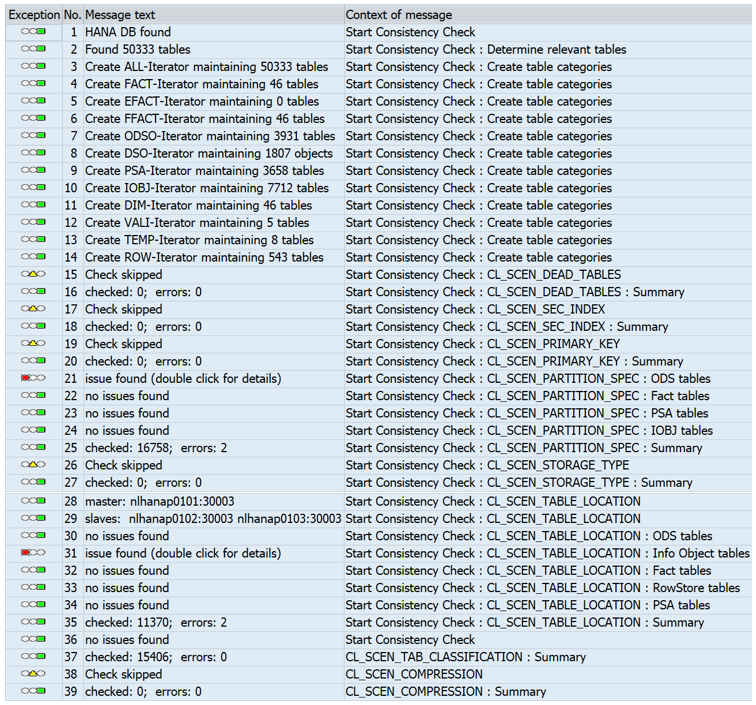
An example is shown below:
When the report has been executed in the background with option “Store issues”, you can rerun the report and choose “Show”.
The issues only will be displayed:
When you double click on an issue, the details will be displayed:
If you want to repair the issue, select the line and click Save and go back (number of selected items will be displayed):
Please keep I mind, that the displayed columns in the table at different check-scenarios differ. Usually following information will be provided with all scenarios:
Exception: Provides information on the severity of the issue. Red: Inconsistency found or error occurred. There is a need of repair, or failure must be eliminated with further tools Yellow: Warning of unexpected results, but there’s no immediate action needed Green: additional info – no action required
Status: indicates the current state of the issue regarding a possible repair action:
OK: no error or inconsistency – just info
REPAIRABLE: this inconsistency should be repairable within RSDU_TABLE_CONSISTENCY
IRREPARABLE: an inconsistency or an error occurred during the check which can’t be solved within the report. Additional actions or analysis needed to solve this issue
FAILED: an inconsistency, in which a repair attempt failed. Refer the entry in column ‘Reason’.
REPAIRED: indicates that the issue was successfully repaired.
Type: shows the type of table like Fact tables, PSA etc.
Reason: This describes the reason why a table is classified as inconsistent. For errors that have occurred during the check, the error text is shown. Some frequently occurring errors are described in section 6 (“Frequently obtained error messages and warnings” at page 14). 5. Table: shown the table name
BW Object: shows the BW Object (InfoCube name, DSO name etc.) the table is liked with.
7.1.3.3 Repair table inconsistencies
A user must first select the issues to be repaired before it can start the repair sequence. Repairing an inconsistence always performs a write action on HANA table properties – the repair will never chance any BW metadata!
Run report RSDU_TABLE_CONSISTENCY again and select repair (with the number of items selected).
Execute the program in background.
Check in SM37 the job log and spool output:
Rerun the check report from chapter “7.1.3.1 Check tables for inconsistencies”. All should be green now!
These actions have to be executed as SYSTEM user in the HANA Tenant DB, preferably from the HANA Studio.
In HANA Studio, go to the Administration Console and select tabs “Landscape” and then “Redistribution”.
Note: These steps can take a long time and should be executed in quiet windows.
7.1.5.1 Save current Table Distribution
Save the current table distribution.
7.1.5.2 Optimize Table Distribution
In the Administration Console, tabs “Landscape” and then “Redistribution”, select the “Optimize Table Distribution” and click Execute. Keep the default settings and click Next. List of the newly, to be implemented, Table Distribution is displayed. Click Execute to start the actual Table Redistribution. The progress can again be followed.
7.1.5.3 Optimize Table Partitioning
In the Administration Console, tabs “Landscape” and then “Redistribution”, select the “Optimize Table Partitioning” and click Execute. Keep the default settings and click Next. A list of the newly, to be implemented, Table Partitioning is displayed. Click Execute to start the actual Table Repartitioning. The progress can again be followed.
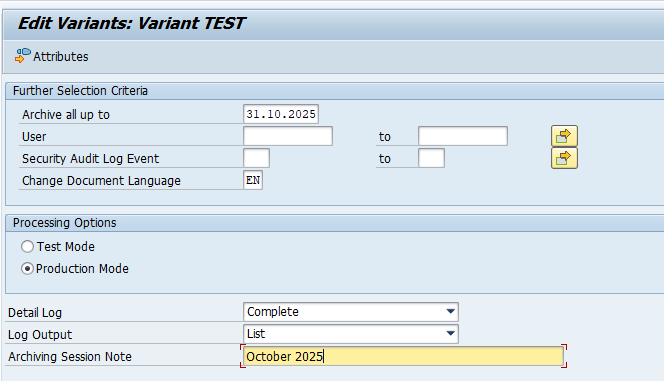
SAP audit log can have high volumes. For that reason most companies use file system to write the audit log.
If you have a SIEM (Security Information and Event Management) solution (like SAP enterprise treat detection, Onapsis, SecurityBridge and many more) that needs to scan your audit log, the best way is to store the audit log data in the database. This ensures that the audit log can be analyzed at high performance.
The unfortunate side of storing in the database means that the audit log table can grow quite fast, which is expensive especially if you run on HANA.
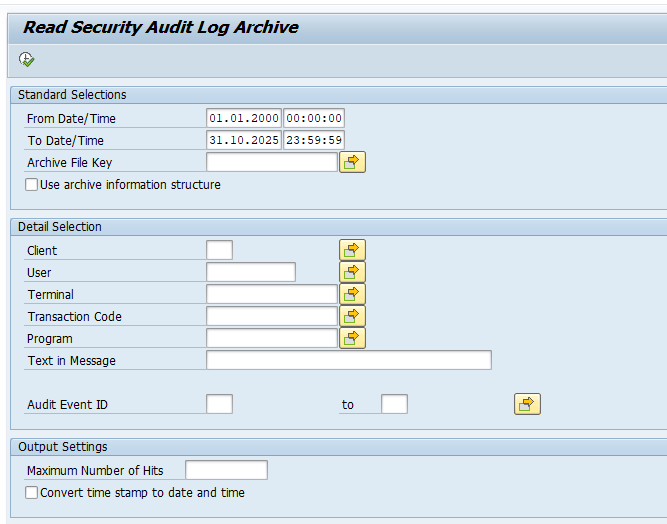
To counter the high costs, you can unload the data from the database into archive files for SAP audit log. This means that your most recent data is in the database for fast analysis, and your history is on cheaper disc storage.
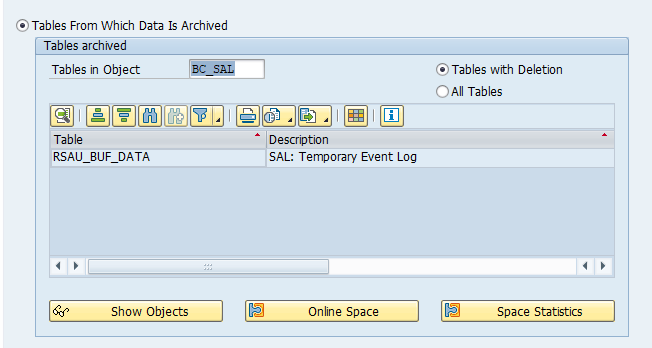
This blog will explain how to archive production order data via object BC_SAL. Generic technical setup must have been executed already, and is explained in this blog.