
As part of many SAP landscapes, Secure Network Communication (SNC) is used to establish secure communication between ABAP and Java systems. If your environment is running with SNC-based communication between ABAP and ME/MII Java systems using SNC certificates stored in Java security directory.
While SAP Focused Run (FRUN) provides extensive monitoring capabilities, we identified a monitoring gap: there is no standard FRUN template available to monitor validity of Java SNC certificates. This means an expired certificate could go unnoticed until communication failures begin occurring between connected systems.
To address this gap, we developed a custom monitoring solution in SAP Focused Run that automatically tracks Java SNC certificate validity, calculates remaining days until expiration, and generates alerts before certificate expires.
Business Challenge
Communication between ABAP and Java systems relies on SNC certificates for secure authentication and encryption.
Java SNC certificate was deployed in the following location:
/usr/sap//J**/sec/SAPSNCS.pse
Although certificate is critical for secure communication, there was no proactive monitoring mechanism available in Focused Run to track its validity.
This created following risks:
Unplanned certificate expiration
ABAP to Java communication failures
Potential business process disruption
Manual monitoring effort
Lack of centralized visibility
Objective was therefore to provide proactive monitoring and alerting through SAP Focused Run.
Solution Overview
Implemented solution performs following functions:
Reads SNC certificate from Java PSE file.
Extracts certificate expiry date.
Calculates number of days remaining before expiration.
Generates output in JSON format.
Sends value to Focused Run through a custom metric.
Raises alerts when configured thresholds are reached.
Architecture Overview
SAPSNCS.pse
│
▼
sapgenpse export_own_cert
│
▼
OpenSSL Certificate Parsing
│
▼
Remaining Days Calculation
│
▼
JSON Output Generation
│
▼
FRUN Custom Metric
│
▼
Alerting & Notification
SNC Certificate Location
SNC certificate used by the Java system is stored in:
/usr/sap//J*/sec/SAPSNCS.pse
This PSE file contains the certificate information required for SNC communication.
Extracting Certificate Expiry Date
SAP utility sapgenpse can export certificate directly from PSE file.
sapgenpse export_own_cert -p SAPSNCS.pse | openssl x509 -noout -enddate
Example output: notAfter=Sep 29 15:45:21 2027
This date is then used to calculate remaining certificate validity.
Custom Monitoring Script
Following shell script was developed to calculate remaining days before certificate expiry.
#!/bin/bash
SAPGENPSE=”sapgenpse”
PSE_FILE=”SAPSNCS.pse”
expiry_date=$(
$SAPGENPSE export_own_cert -p “$PSE_FILE” 2>/dev/null |
openssl x509 -noout -enddate |
cut -d= -f2
)
expiry_epoch=$(date -d “$expiry_date” +%s)
current_epoch=$(date +%s)
diff_days=$(( (expiry_epoch – current_epoch) / 86400 ))
echo “{“type”:”integer”,”name”:”NumDays”,”value”:$diff_days}” \
/tmp/NUMDAYS.json
Sample Output
generated JSON file contains the certificate validity in days.
JSON
{
“type”:”integer”,
“name”:”NumDays”,
“value”:30
}
This output can be consumed directly by SAP Focused Run custom monitoring metrics.
Creating a Custom Metric in FRUN
Step 1: Create a Custom Monitoring Script
Deploy the script on the managed host where SAPSNCS.pse exists.
Example location:
Shell
/usr/sap/SID/J**/sec/calc_sapsnc_validity.sh
Step 2: Configure Simple Diagnostics Agent Script Metric
Create a new metric.
Example:
| Parameter | Value |
|---|---|
| Metric Name | SNC Certificate Validity |
| Collection Type | Script |
| Script | calc_sapsnc_validity.sh |
| JSON Attribute | NumDays |
| Metric Type | Numeric |
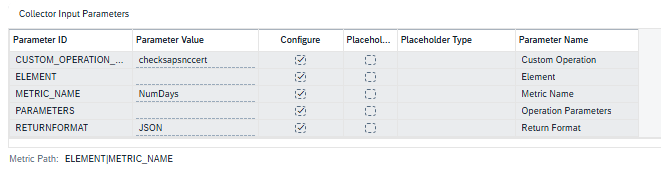
Custom agent metric was configured in SAP Focused Run to collect generated JSON value.
Metric periodically collects remaining validity days and displays them centrally in FRUN monitoring dashboards.
This provides sufficient lead time for certificate renewal activities before the certificate reaches its expiration date.
Monitoring Benefits
This implementation delivers several operational benefits:
Closes a monitoring gap in SAP Focused Run Provides centralized certificate visibility
Closes a monitoring gap in SAP Focused Run
Provides centralized certificate visibility
Eliminates manual certificate validation checks
Enables proactive alerting
Reduces risk of ABAP-Java communication failures
Improves overall operational readiness
Prevents service disruptions caused by expired SNC certificates
Lessons Learned
During implementation, one challenge encountered was script compatibility after transferring files from Windows to Linux systems. Script initially contained Windows CRLF line endings, resulting in execution errors.
Converting script to UNIX format resolved the issue:
dos2unix calc_sapsnc_validity.sh
Conclusion
Java SNC communication is a critical component for secure integration between ABAP and Java systems. Since SAP Focused Run does not provide a standard monitoring template for Java SNC certificate validity, organizations may lack visibility into upcoming certificate expirations.
By implementing a lightweight custom monitoring solution using sapgenpse, OpenSSL, and SAP Focused Run custom metrics, we successfully introduced proactive monitoring and alerting for Java SNC certificates.
This approach is simple to implement, easy to maintain, and significantly reduces risk of communication outages caused by expired SNC certificates.
Have you implemented custom certificate monitoring in SAP Focused Run or SAP Solution Manager? Feel free to share your experience and monitoring approaches in the comments.