This blog will explain how to switch on integrity protection for file based audit log. For full explanation of the SAP audit log, read this blog.
The main OSS note for this feature is 2033317 – Integrity protection format for Security Audit Log.
Activation steps
Step 1. In RZ11 set parameter rsau/integrity to 1.
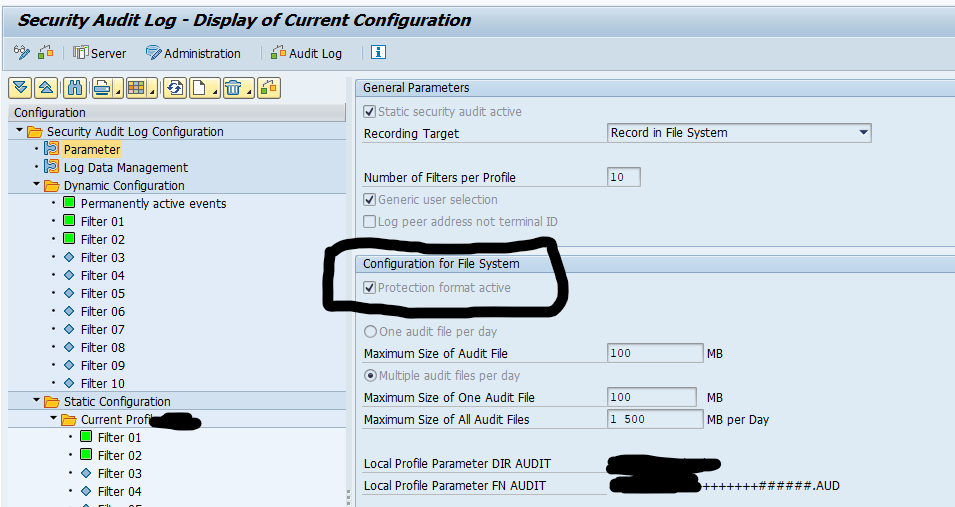
Step 2. In transaction RSAU_CONFIG set the Protection format active tick box in the Parameter section:
Step 3. In transaction RSAU_ADMIN and create the HMAC key:
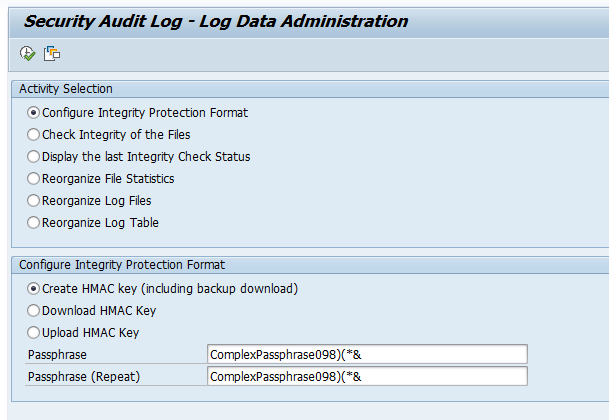
Step 4. Save this HMAC key properly including the passphrase!
Checking and validation steps
To validate if the audit log files integrity is ok (no tampering has been done), start transaction RSAU_ADMIN and select the option: Check Integrity of the Files:
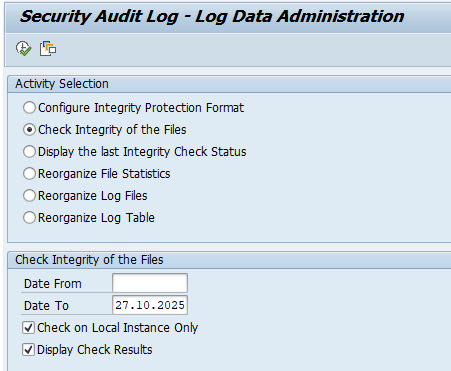
Now run and see the results.
You can also run program RSAU_FILE_ADMIN in batch mode (for example every weekend), so that the integrity checking is done on regular basis. In that case, you can use the faster option to Display the Last Integrity Check Status.
Reference OSS notes
- 3009171 – RSAU_ADMIN | error when checking the integrity protection format
- 3367960 – Files created by the Security Audit Log have a different format than defined via profile parameter FN_AUDIT
- 3432332 – SAL | Parameter rsau/max_diskspace/per_day and rsau/max_diskspace/per_file cannot have the value 0
- 3495228 – RSAU_ADMIN | Integrity protection check for files without integrity protection format
- 3508896 – RSAU_ADMIN | Optimization of integrity protection check