Tables in SAP basis area

As basis you are sometimes confronted with special requests. For these special requests, you will need to know for part SAP uses which tables so you can use SE16N for internal lookup of information.

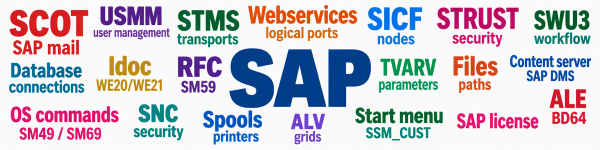
The below is a list of tables used in SAP basis.

Disclaimer 1: table list is not complete. 
Disclaimer 2: tables can change each SAP version.

SAP mail / SCOT

BCSD_BLMODULE
BCSD_BREAKLOOP
BCSD_RQST
BCSD_STML
SXADMINTAB
SXCONVERT
SXCONVERT2
SXCOS
SXCOS_T
SXCPDEF
SXCPRECV
SXCPSEND
SXDEVTYPE
SXDEVTYPL
SXDOMAINS
SXJOBS
SXNODES
SXPARAMS
SXRETRY
SXROUTE
SXSERV
SXTELMOIN
SXTELMOOUT

USMM user management

TUAB_ANNOTATION
TUAB_WF_TYPE
TUAB_WF_TYPE_T
TUAPP
TUAPPT
TUAPUSG
TUCON
TUGRP
TUJOB
TUL_AC_UNIT
TUL_AC_UNITT
TUL_ACRES
TUL_ACTTC
TUL_CLIENTS
TUL_CONTROL
TUL_CPU
TUL_CPU_RAW
TUL_ENG_PL
TUL_ENG_PROT
TUL_ENG_RESULT
TUL_ENG_RESULT_1
TUL_ENGINES
TUL_ENGINEST
TUL_JOB
TUL_MEMOS
TUL_MSG
TUL_TRANS
TUL_TRSTAT
TUL_UNIT
TUL_UNITT
TULAPP_PL
TULTRANS
TUMRES
TUMSG
TUPL
TUPLT
TUPRO
TUSERSETTING
TUSERSETTINGPROD
TUSTAT
TUTYHLP
TUTYP
TUTYPA
TUTYPASYS
TUTYPNOWSYS
TUTYPP
TUTYPPL
TUZUSSYS

STMS transports and settings

TMSBCIBOX
TMSBCIIBOX
TMSBCIJOY
TMSBCINEX
TMSBCINTAB
TMSBCIOBJ
TMSBCIXBOX
TMSCDES
TMSCDES_S
TMSCDESD
TMSCDIST
TMSCDOL
TMSCDOM
TMSCDOMT
TMSCNFS
TMSCNFST
TMSCROUTE
TMSCSYS
TMSCSYST
TMSCTOK
TMSFSYSH
TMSFSYSL
TMSMCONF
TMSPCONF
TMSPVERS
TMSSRV
TMSTCRI
TMSTLOCKP
TMSTLOCKR
TMSTOUT
TMSUCONF

E070L

E071

E071K

STMS History

TMSQLASTWL
TMSQNOTES
TMSQNOTESH
TMSQWL
TMSQWLF
TMSQWLFH
TMSQWLH

Database connections

DBCON

DBCONUSR

Files

FILENAME
FILENAMECI
FILEPATH
FILESYS
FILETEXT
FILETEXTCI
OPSYSTEM
OPTEXT
PARAMVALUE
PATH
PATHTEXT
USER_DIR

STRUST settings

SSF_PSE_D
SSF_PSE_H
SSF_PSE_T
SSFAPPLICT
SSFARGS
STRUSTCAB
STRUSTCERT
STRUSTCRL
STRUSTCRP
STRUSTCRPT
STRUSTCRR
STRUSTCRRT
STRUSTCRS
STRUSTCRT
STRUSTSSL
STRUSTSSLT
STRUSTWSSE
STRUSTWSSET
TWPSSO2ACL
USERINFO_STORAGE
USRACLEXT
USRCERTMAP
USRCERTRULE

Content server and SAP DMS settings

CREP_FTP
CREP_RPC
CREP
CREP_FILE
CREP_HTTP
CREP_LREP
CREP_R3DB
CREP_RFC
CREP_TREE
CREPDESCR
CREPDOCSP

SWU3 workflow settings

SWFGPACTIVITIES
SWFGPCONF
SWFGPDEPLOY
SWFGPGENOBJNUM
SWFGPREUSE
SWFGPROLEDEF
SWFGPROLEINST
SWFGPWULACDEF
SWFGPWULDATOBJ
SWFGPWULFLOWS
SWFGPWULTASKS

Classic TVARV

TVARUVN
TVARV
TVARVC

SICF nodes

ICF_SESSION_CNTL
ICFALIAS
ICFAPPLICATION
ICFBUFFER
ICFDELTA
ICFDOCU
ICFHANDLER
ICFHANDTREE
ICFIMPORT
ICFINSTACT
ICFLOGORDER
ICFNOHANLDER
ICFSECPASSWD
ICFSERVICE
ICFSERVLOC
ICFVIRHOST

Start menu settings

SSM_CUST

Webservices logical ports & soap runtime

SRT_LP
SRT_LP_FEAT
SRT_LP_OP_FEAT
SRT_LP_SXI_ADDR
SRT_LP_T

SPROXMSGREL
SRT_SLT_HOSTS
SRT_ASSIGN_DATA
SRT_ASSIGN_DIR
SRT_ASSIGN_DIR_T
SRT_AU_TEST_RECI
SRT_CACHE
SRT_CC_CHANGES
SRT_CC_CHANGES_H
SRT_CC_MIF_CDATA
SRT_CC_MIF_CDIR
SRT_CC_MIF_LDATA
SRT_CC_PC
SRT_CC_PP
SRT_CC_ST_ACT
SRT_CSTC
SRT_CDTC_C_DET
SRT_CDTC_CHD_ID
SRT_CDTC_DESCR_T
SRT_CDTC_G_DET
SRT_CDTC_S_DET
SRT_CFG_BNDG
SRT_CFG_CFGVAL
SRT_CFG_CHG_TAB
SRT_CFG_CLI_ASGN
SRT_CFG_DATA
SRT_CFG_DEF_ASGN
SRT_CFG_DIR
SRT_CFG_DIR_T
SRT_CFG_ICF_DET
SRT_CGF_ICF_USE
SRT_CFG_LOG_HDR
SRT_CFG_LOG_ITEM
SRT_CFG_LOG_SRCH
SRT_CFG_MLP_DATA
SRT_CFG_SRV_ASGN
SRT_CFG_STS_ASGN
SRT_CFG_SV_ASN_T
SRT_CFG_TPLC_DAT
SRT_CFG_TPLC_DIR
SRT_CFG_TRC
SRT_CFG_TRC_ADM
SRT_CFG_VAL_DET
SRT_CFG_VAL_DIR
SRT_CFG_VAL_UPD
SRT_CFG_VALUES
SRT_CG_SYST_ATTR
SRT_CG_SYST_DIR
SRT_CG_WSDL_CONT
SRT_CG_WSDL_URL
SRT_CHECK_HEADER
SRT_CHECK_RESULT
SRT_CHECK_STATUS
SRT_CLI_NR
SRT_CNTRL_TASKS
SRT_CON_SYSTEMS
SRT_CTRL_TSK_MSG
SRT_DEST_CFGV
SRT_DEST_DATA
SRT_DEST_DIR
SRT_DEST_DIR_T
SRT_DEST_DIR_V
SRT_DEST_WSDL
SRT_DOMAIN_SYS
SRT_DOMAIN_SYS_T
SRT_DOMN_DIR
SRT_DOMN_DIR_T
SRT_DOMN_SYSTS
SRT_DT_CFG_DATA
SRT_DT_CFG_DIR
SRT_DT_CFG_DIR_T
SRT_DT_CHG_DIR
SRT_DT_CHG_DIR_L
SRT_DT_CHG_STAT
SRT_DT_CHG_STATL
SRT_FALLBACK_LPS
SRT_FW_SETTINGS
SRT_GEN_CLNT_DIR
SRT_IDENTIFIER
SRT_ISO_SET_C
SRT_ISO_SET_P
SRT_LOG_TENANT
SRT_LOG_TENANT_R
SRT_LP
SRT_LP_FEAT
SRT_LP_OP_FEAT
SRT_LP_SXI_ADDR
SRT_LP_T
SRT_LP_URL_ASGN
SRT_LRD_HEADER
SRT_LRD_ROUTING
SRT_MED_SYS
SRT_MED_SYS_T
SRT_MIG_HIST
SRT_NAME_CACHE
SRT_OBSERV_DATA
SRT_PEND_TASK
SRT_PRF_CFG_DIR
SRT_PRF_CFGVAL
SRT_PRF_DATA
SRT_PRF_DIR
SRT_PRE_DIR_T
SRT_PRE_DIR_V
SRT_PRO_WKL
SRT_PROF_ASSIGN
SRT_PRULE_ASSIGN
SRT_PRULE_DATA
SRT_PRULE_DIR
SRT_PRX_CLNT_DIR
SRT_PRX_EX_CHECK
SRT_PT_INDEX
SRT_PX_MSG_ASGN
SRT_REG_ADRMAP
SRT_REG_BACKUPR
SRT_REG_BIND
SRT_REG_CONFIG
SRT_REG_OPERAT
SRT_REGISTRY
SRT_REGISTRYT
SRT_REQ_DATA_C
SRT_REQ_DATA_CON
SRT_REQ_DATA_P
SRT_REQ_DATA_PIF
SRT_REQ_DATA_PRO
SRT_REQ_DIR
SRT_REQ_DIR_T
SRT_REV_PROXY
SRT_RTC_BNDG
SRT_RTC_CFGVAL
SRT_RTC_CG_DATA
SRT_RTC_CG_DATAL
SRT_RTC_CG_DIR
SRT_RTC_DATA
SRT_RTC_DATA_RT
SRT_RTC_DATAL
SRT_RTC_DIR
SRT_RTC_DT_IF_SD
SRT_RTC_DT_RT
SRT_RTC_DT_RT_MD
SRT_RTC_WSIL
SRT_RTC_WSILL
SRT_SAVED_SEARCH
SRT_SCP_ASSIGN
SRT_SDN_URL_C
SRT_SECSTORE_LNK
SRT_SOAM_CONNECT
SRT_SR_CLASS_S_T
SRT_SR_CLASS_SYS
SRT_SR_CLASS_V_T
SRT_SR_CLASS_VAL
SRT_SR_SEP
SRT_SR_SEP_T
SRT_SR_SYSTEM
SRT_SR_UDDI_ROW
SRT_SR_VW_ASSIGN
SRT_SR_VM_DETAIL
SRT_SR_VM_HEADER
SRT_SR_WSD
SRT_SR_WSD_T
SRT_ST_ACT_A
SRT_ST_ACT_C
SRT_ST_ACT_C_C
SRT_ST_ACT_P
SRT_ST_ACT_P_C
SRT_ST_REQ_A
SRT_ST_REQ_C
SRT_ST_REQ_P
SRT_SYS_NR
SRT_SYS_SETTINGS
SRT_SYST_APPL
SRT_SYST_APPL_HT
SRT_SYST_CL_DATA
SRT_SYST_CL_DIR
SRT_SYSTEM_DIR
SRT_TEST_CONCATE
SRT_TMP_CG_DATA
SRT_TMP_CG_DATAL
SRT_TRACE_USERS
SRT_TRANSP
SRT_TRANSP_A
SRT_TRANSP_KEYS
SRT_TRC_ASSIGN
SRT_TRC_COUNTER
SRT_TRC_FILES
SRT_U_ASSIGN_DAT
SRT_U_ASSIGN_DIR
SRT_UASSIGN_DIR
SRT_USER_DATA
SRT_USER_DIR
SRT_USER_DIR_T
SRT_WHITE_LIST
SRT_WSDL_CACHE_P
SRT_WSDL_DIR
SRT_WSDL_DIR_T
SRT_WSDL_DS_ASGN
SRT_WSDL_ENTITY
SRT_WSIL_CACHE_C
SRT_WSIL_CACHE_P
SRT_WSIL_TMP
SRT_WSP_WSDL_FLA
SRTFT_ASSIGN
SRTFT_ASSIGN_IF
SRTFT_ASSIGN_SEC
SRTFT_NM_CFG_MAP
SRTFT_QDATA_LOG
SRTFT_QUEUE
SRTFT_QUEUE_DATA
SRTFT_QUEUE_LG_T
SRTFT_QUEUE_LOG

Content server settings

CREP_FTP
CREP_RPC
CREP
CREP_FILE
CREP_HTTP
CREP_LREP
CREP_R3DB
CREP_RFC
CREP_TREE
CREPDESCR
CREPDOCSP

Idoc settings WE20, WE21

EDMA
EDP12
EDP13
EDP21
EDPP1
EDIPO
EDIPO2
EDIPOA
EDIPOD
EDIPOF
EDIPOI
EDIPORT
EDIPOX
EDIPOXH

SAP license key

SAPLIKEY

OS commands SM49, SM69

SXPGCOSTAB
SXPGCOTABE
SXPGHISTOR

SNC

SNCSYSACL

TXCOMSECU
USRACL
TSP0U

RFC’s SM59

RFCTA
RFCTYPE
RFCLIST
RFC_TT_ACL
RFCATTRIB
RFCCBWHITELIST
RFCCHECK
RFCCMC
RFCDES
RFCDESSECU
RFCDOC
RFCGO
RFCSTXTAB
RFCSYSACL
RFCSYSACL_CLNT
RFCTRUST

ALE distribution model BD64

TBDLI
TBDLS
TBDLST
TBDLT
TBDBR
TBDBRF
TBDA2
TBD00
TBD00T
TBD03
TBD05
TBD06
TBD20
TBD30
TBDTPBDF
TBDTPBR
TBDTPMD

TBLSYSDEST
TBSPECDEST

ALV grids

LTDX
LTDXD
LTDXT

Secstore

RSECACHK
RSECACTB
RSECSESSION_CL
RSECTAB
RSECVAL
RSECVAL_CL

Spools and printers

TSP03
TSP03A
TSP03C
TSP03D
TSP03L
TSP03POCCNF
TSP03POCPRE
TSP03T
TSPCMDS
TSPLOMS
TSPROMS
TSPSV

User menu

SMEN_BUFFC

SLT data replication tips and tricks

SAP SLT server can be used to replicate data from SAP system to a target system. In this blog we will not discuss if it is a good or bad architecture to replicate source data directly or not. Focus is on the technical setup and operation of the SAP SLT server for data replication.

SAP references

Help.sap.com reference for SLT can be found here.

SLT performance optimization guide can be found here.

SAP learning on SLT can be found here.

DMIS plugin updates in source and replication server

For replication to work properly, do regularly update the DMIS plugin in both source and replication server. Since S4HANA DMIS is integrated into the core: 2572945 – DMIS compatibility with SAP S/4HANA.

The OSS notes for SLT must be updated on both source and replication server. Read more in this blog.

SLT monitoring

Monitoring is described in OSS note 2008039 – How to monitor the replication process – SLT.

Make sure job /1LT/IUC_HEALTH_C with program R_DMC_HC_RUN_CHECKS runs.

SAP Focused Run has special tools for monitoring SLT. Read more in this blog.

ZDO upgrades and SLT

If you are running SLT and want to use ZDO upgrade, please be aware they use very similar technology. When performing ZDO upgrade when SLT is running, do take the proper upgrade path including SLT.

Change data capture

DHCDCMON (CDS View Replication Monitor) is the monitoring transaction for the SAP Change Data Capture (CDC) framework used by ABAP CDS-based data replication.

SAP has developed a stability contract concept and an annotation that marks CDS Views as extraction enabled, and SAP commits to keep these CDS Views Stable and compatible (or replace them by compatible views, once the original ones get deprecated).

Call CL_DD_RTOBJ_FACTORY=>READ_ACTIVE_RTOBJ( name_of_your_cds_view ). You will get an object offering the method IF_DD_RTOBJ_TBFUNCDEP_SOURCE~GET_TABLE_FUNC_DEPENDENCIES( ). The returned table contains a list of AMDPs that might be called when using the CDS View is used. This list does contain only the AMDPs directly called from the CDS artefacts, but not AMDPs called by the listed AMDPs. If the list is empty, you are safe that no AMDP is called.

Data migration cockpit interference

The new SAP data migration cockpit will use, for some use cases, the DMIS component as well. See S4HANA migration cockpit as successor of LSMW – Saptechnicalguru.com and Setting up SAP S/4 HANA FIORI Migrate Your Data – … – SAP Community.

If you get into issues, check these OSS notes:

OSS notes

Trouble shooting OSS notes:

Functionality related OSS notes:

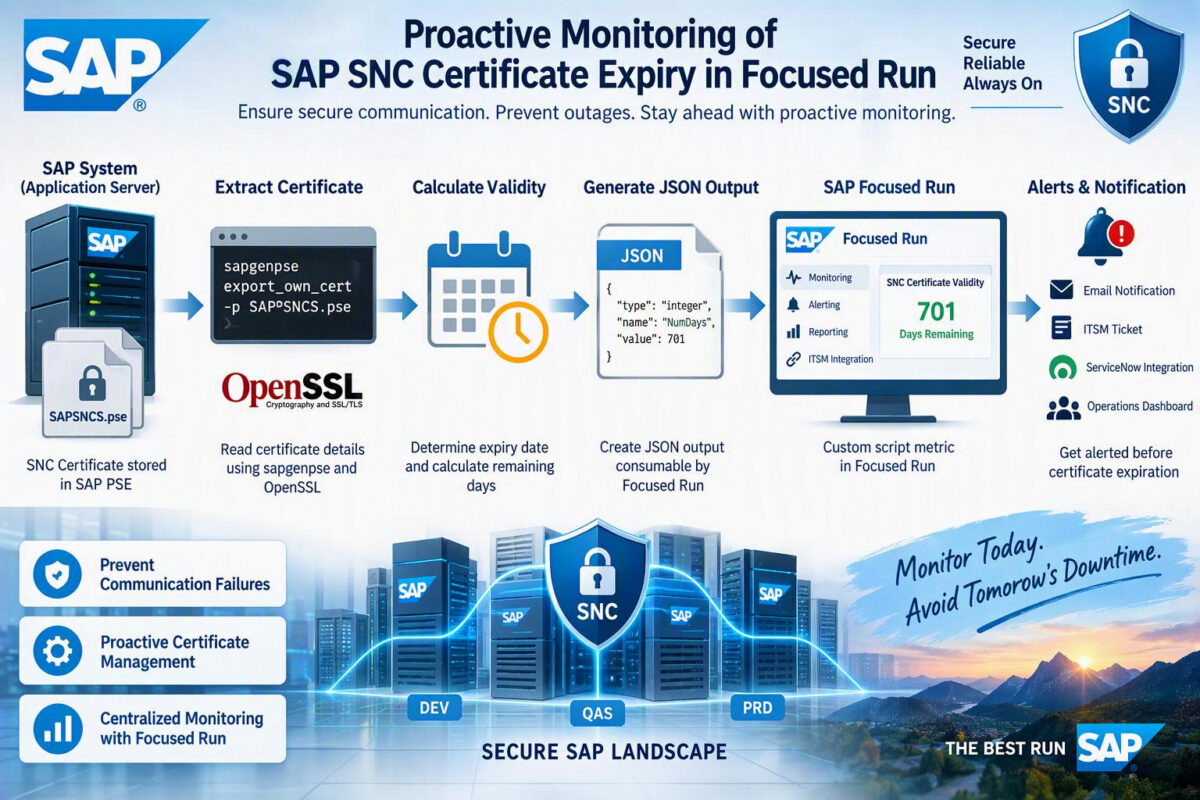
Enable JAVA SNC Certificate monitoring in FRUN

As part of many SAP landscapes, Secure Network Communication (SNC) is used to establish secure communication between ABAP and Java systems. If your environment is running with SNC-based communication between ABAP and ME/MII Java systems using SNC certificates stored in Java security directory.

While SAP Focused Run (FRUN) provides extensive monitoring capabilities, we identified a monitoring gap: there is no standard FRUN template available to monitor validity of Java SNC certificates. This means an expired certificate could go unnoticed until communication failures begin occurring between connected systems.

To address this gap, we developed a custom monitoring solution in SAP Focused Run that automatically tracks Java SNC certificate validity, calculates remaining days until expiration, and generates alerts before certificate expires.

Business Challenge

Communication between ABAP and Java systems relies on SNC certificates for secure authentication and encryption.

Java SNC certificate was deployed in the following location:
/usr/sap//J**/sec/SAPSNCS.pse

Although certificate is critical for secure communication, there was no proactive monitoring mechanism available in Focused Run to track its validity.

This created following risks:

Unplanned certificate expiration
ABAP to Java communication failures
Potential business process disruption
Manual monitoring effort
Lack of centralized visibility

Objective was therefore to provide proactive monitoring and alerting through SAP Focused Run.

Solution Overview

Implemented solution performs following functions:

Reads SNC certificate from Java PSE file.
Extracts certificate expiry date.
Calculates number of days remaining before expiration.
Generates output in JSON format.
Sends value to Focused Run through a custom metric.
Raises alerts when configured thresholds are reached.

Architecture Overview

SAPSNCS.pse
│
▼
sapgenpse export_own_cert
│
▼
OpenSSL Certificate Parsing
│
▼
Remaining Days Calculation
│
▼
JSON Output Generation
│
▼
FRUN Custom Metric
│
▼
Alerting & Notification

SNC Certificate Location

SNC certificate used by the Java system is stored in:
/usr/sap//J*/sec/SAPSNCS.pse

This PSE file contains the certificate information required for SNC communication.

Extracting Certificate Expiry Date

SAP utility sapgenpse can export certificate directly from PSE file.

sapgenpse export_own_cert -p SAPSNCS.pse | openssl x509 -noout -enddate

Example output: notAfter=Sep 29 15:45:21 2027

This date is then used to calculate remaining certificate validity.

Custom Monitoring Script

Following shell script was developed to calculate remaining days before certificate expiry.

#!/bin/bash
SAPGENPSE="sapgenpse"
PSE_FILE="SAPSNCS.pse"
expiry_date=$(
$SAPGENPSE export_own_cert -p "$PSE_FILE" 2>/dev/null |
openssl x509 -noout -enddate |
cut -d= -f2
)
 
expiry_epoch=$(date -d "$expiry_date" +%s)
current_epoch=$(date +%s)
 
diff_days=$(( (expiry_epoch - current_epoch) / 86400 ))
 
echo "{"type":"integer","name":"NumDays","value":$diff_days}" \

/tmp/NUMDAYS.json

Sample Output

generated JSON file contains the certificate validity in days.

JSON
{
"type":"integer",
"name":"NumDays",
"value":30
}

This output can be consumed directly by SAP Focused Run custom monitoring metrics.

Creating a Custom Metric in FRUN

Step 1: Create a Custom Monitoring Script

Deploy the script on the managed host where SAPSNCS.pse exists.

Example location:

Shell

/usr/sap/SID/J**/sec/calc_sapsnc_validity.sh

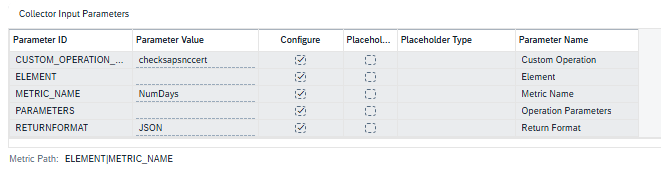
Step 2: Configure Simple Diagnostics Agent Script Metric

Create a new metric.

Example:

ParameterValue
Metric NameSNC Certificate Validity
Collection TypeScript
Scriptcalc_sapsnc_validity.sh
JSON AttributeNumDays
Metric TypeNumeric

Custom agent metric was configured in SAP Focused Run to collect generated JSON value.

Metric periodically collects remaining validity days and displays them centrally in FRUN monitoring dashboards.

This provides sufficient lead time for certificate renewal activities before the certificate reaches its expiration date.

Monitoring Benefits

This implementation delivers several operational benefits:

Closes a monitoring gap in SAP Focused Run Provides centralized certificate visibility

Closes a monitoring gap in SAP Focused Run
Provides centralized certificate visibility
Eliminates manual certificate validation checks
Enables proactive alerting
Reduces risk of ABAP-Java communication failures
Improves overall operational readiness
Prevents service disruptions caused by expired SNC certificates

Lessons Learned

During implementation, one challenge encountered was script compatibility after transferring files from Windows to Linux systems. Script initially contained Windows CRLF line endings, resulting in execution errors.

Converting script to UNIX format resolved the issue:
dos2unix calc_sapsnc_validity.sh

Conclusion

Java SNC communication is a critical component for secure integration between ABAP and Java systems. Since SAP Focused Run does not provide a standard monitoring template for Java SNC certificate validity, organizations may lack visibility into upcoming certificate expirations.

By implementing a lightweight custom monitoring solution using sapgenpse, OpenSSL, and SAP Focused Run custom metrics, we successfully introduced proactive monitoring and alerting for Java SNC certificates.

This approach is simple to implement, easy to maintain, and significantly reduces risk of communication outages caused by expired SNC certificates.

Have you implemented custom certificate monitoring in SAP Focused Run or SAP Solution Manager? Feel free to share your experience and monitoring approaches in the comments.