
This blog will give tips and tricks for SAP profile parameters.
List of all profile parameters
Program RSPARAM will list all profile parameters:

The system default, the user defined value and the description is listed.
Program RSPFPAR can be used for a selective set of parameters.
Explanation note: 3202666 – The RSPARAM report usage.
Changing profile parameters
Transactions RZ10 and RZ11 can be used to change the profile parameters. If lost after restart, check OSS note 2228845 – RZ10: New or changed value is not active after restart.
Check also OSS note 2789094 – Maintaining ASCS profiles using RZ10.
Checking history of profile parameters
Transaction TU02 will list the profile parameter changes:
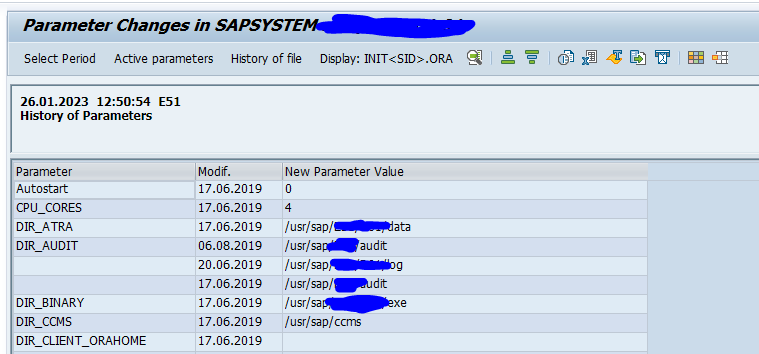
A different way to check the history is using SAP Focused Run configuration validation. Read more on this feature in this blog.
Technical tables and routines
Table TPFET contains the current parameters.
Table PAHI is keeping the history of parameter changes (if not updated, read note 3205243 – PAHI Table data is not updated).
RFC enabled function module TH_GET_PARAMETER can be used to read a profile parameter value.
Function modules
Function module PFL_IMPORT_ACTIVE_SRV_PROFILES is doing the same action as RZ10 menu action Utilities / Import profiles / Of active servers.
PFL_GET_PROFILE_LIST – list profiles known in DB
PFL_READ_PROFILE_FROM_DB – read a profile version from the database
PFL_READ_PROFILE_FROM_FILE – parse a profile file from the filesystem
PFL_READ_PROFILE_FROM_FILE – imports from file (does not update the database)
sapcontrol can also get parameters.