Any user can add favorite transactions to his personal menu. This can be done in the SAP menu by right clicking on the menu and select the option add to favorites.
Sharing favorites
A user can share favorites by downloading them and sending the file to another user to upload. Upload or download to PC: go to menu Favorites and select Download to PC or Upload from PC. Reference OSS note 456728 – Easy Access: download/upload of favorites.
Technical parts of favorites
The tables for favorites are explained in OSS note 2169093 – User favorites are missing:
- SMEN_BUFFC – Table for Storing Favorites
- SMENFAVDAT – Date of Last Change to Favorites
- SMEN_BUFFI – Links for Favorites
Currently there is no know mass download/upload program for user favorites. Custom program can be written using function modules MENU_FAVORITES_DOWNLOAD and MENU_FAVORITES_UPLOAD.
Favorites across versions
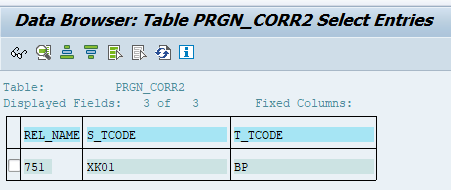
When upgrading to a newer SAP version, transactions get updated as well. Example in SAP ECC transaction XK01 is used for creating vendors. In S4HANA this is replace with transaction BP.
SAP table PRGN_CORR2 contains these translations:
Background OSS note: 3454002 – List of obsolete transaction codes and authorization objects.
With an upgrade the user favorites are not updated automatically.