Archiving MM- Accounting interface posting data

This blog will explain how to archive MM accounting interface posting data via object MM_ACCTIT. Generic technical setup must have been executed already, and is explained in this blog.

The MM_ACCTIT is strange object. Since it is about intermediate data which is normally not viewed by users, there is no read program. In worst case there is a reload program. Do also read about the option to stop using these intermediate tables if the business does not require them.

Avoiding data in MM-accounting interface tables

Please check OSS note 48009 – Tables ACCTHD, ACCTIT, ACCTCR: Questions and answers to see if you can fully avoid data being written to the tables.

Object MM_ACCTIT

Go to transaction SARA and select object MM_ACCTIT.

Dependency schedule (no dependency):

Tables that are archived:

Technical programs and OSS notes

Write program: MM_ACCTIT_WRI

Delete program: MM_ACCTIT_DEL

Read program: none. Only write and delete.

Relevant OSS notes:

Application specific customizing

MM_ACCTIT has no application specific customizing.

Executing the write run and delete run

In transaction SARA, MM_ACCTIT select the write run:

Select your data, save the variant and start the archiving write run.

After the write run is done, check the logs. MM_ACCTIT archiving has high speed and high percentage of archiving (up to 100%).

Deletion run is standard by selecting the archive file and starting the deletion run.

Data archiving: CO line items

This blog will explain how to archive CO line items via object CO_ITEM. Generic technical setup must have been executed already, and is explained in this blog.

Object CO_ITEM

Go to transaction SARA and select object CO_ITEM.

Dependency schedule (no dependency):

Tables that are archived:

Most important:

  • COEP: CO line items
  • COBK: CO object document header

Technical programs and OSS notes

Write program: CO_ITEM_WRI

Delete program: CO_ITEM_DEL

Read program: RKCOITS4

Relevant OSS notes:

Application specific customizing

In the application specific customizing for CO_ITEM you have to set the residence time in months per CO type:

Executing the write run and delete run

In transaction SARA, CO_ITEM select the write run:

Select your data, save the variant and start the archiving write run.

Give the archive session a good name that describes date range. This is needed for data retrieval later on.

After the write run is done, check the logs. CO_ITEM archiving has average speed, but high percentage of archiving (up to 100%).

Deletion run is standard by selecting the archive file and starting the deletion run.

Data retrieval

Start the data retrieval program and fill selection criteria:

To avoid reporting issues, see OSS note 2676572 – SARI/KSB5 Archived documents not displayed in line item report, fill the archiving structure SAP_CO_ITEM_001.

Data archiving: purchase documents

This blog will explain how to archive purchase orders and purchase documents via object MM_EKKO. Generic technical setup must have been executed already, and is explained in this blog.

Object MM_EKKO

Go to transaction SARA and select object MM_EKKO.

Dependency schedule:

No dependencies.

Main tables that are archived:

  • EKKO: purchase document header
  • EKPO: purchase document item

Technical programs and OSS notes

Pre-processing program: RM06EV70

Write program: RM06EW70

Delete program: RM06ED70

Read program: RM06ER30

Relevant OSS notes:

Application specific customizing

In the application specific customizing for MM_EKKO you can maintain the document retention time settings:

You have to set the residence time per purchase order type:

Preprocessing

In transaction SARA, MM_EKKO select preprocessing:

There are quite some reasons why a purchase order cannot be archived.

Executing the write run and delete run

In transaction SARA, MM_EKKO select the write run:

Select your data, save the variant and start the archiving write run.

Give the archive session a good name that describes the purchasing group and year. This is needed for data retrieval later on.

After the write run is done, check the logs. MM_EKKO archiving has average speed, and medium percentage of archiving (50 to 90%).

Deletion run is standard by selecting the archive file and starting the deletion run.

Data retrieval

For MM_EKKO start the read via SARA:

Then select the archive file(s).

Result is in a simple list.

If you setup the archiving infostructures, the popup with the files will be skipped.

Data archiving: change documents

This blog will explain how to archive change documents via object CHANGEDOCU. Generic technical setup must have been executed already, and is explained in this blog.

Object CHANGEDOCU

Go to transaction SARA and select object CHANGEDOCU.

Dependency schedule: (none):

Change documents are archived as part of other archiving objects. For specific changes you might want to archive the changes sooner to get a grip on CDHDR and CDCLS/CDPOS table sizes and amount of entries.

Main tables that are archived:

  • CDHDR (change header)
  • CDCLS (change details)

Technical programs and OSS notes

Write program: CHANGEDOCU_WRI

Delete program: CHANGEDOCU_DEL

Read program: CHANGEDOCU_READ

Reload program: CHANGEDOCU_REL

Relevant OSS notes:

Application specific customizing

No application specific customizing is required for CHANGEDOCU archiving.

Executing the write run and delete run

In transaction SARA, CHANGEDOCU select the write run:

Select your data, save the variant and start the archiving write run.

Give the archive session a good name that describes change document object(s) and year. This is needed for data retrieval later on.

After the write run is done, check the logs. CHANGEDOCU archiving has average speed and very high percentage of archiving (up to 100%).

Deletion run is standard by selecting the archive file and starting the deletion run.

Data retrieval

Don’t start the data retrieval program from SARA. Start program CHANGEDOCU_READ from SA38 (see OSS note 3395609 – Default read program for CHANGEDOCU in transaction AOBJ):

In the second screen select the archive files. Now wait long time before data is shown.

For faster retrieval, setup data archiving infostructures SAP_CHANGEDOCU1 and SAP_CHANGEDOCU2. These are not active by default. So you have to use transaction SARJ to set them up and later fill the structures (see blog).

Now transaction RSSCD100 can be use for data retrieval:

Don’t forget to select the tick box “Read from archive info system”.

Another option is via transaction SARE (archive explorer) and then choose object CHANGEDOCU with archive structure SAP_CHANGEDOCU1.

Data archiving: purchase requisitions

This blog will explain how to archive purchase requisitions via object MM_EBAN. Generic technical setup must have been executed already, and is explained in this blog.

Object MM_EBAN

Go to transaction SARA and select object MM_EBAN.

Dependency schedule:

No dependencies.

Main table that is archived:

  • EBAN (Purchase requisitions)

Technical programs and OSS notes

Pre-processing program: RM06BV70

Write program: RM06BW70

Delete program: RM06ID70

Read program: RM06BR30

Relevant OSS notes:

Application specific customizing

In the application specific customizing for MM_EBAN you can maintain the document retention time settings:

You have to set the residence time per requisition type:

Preprocessing

In transaction SARA, MM_EBAN select preprocessing:

There are quite some reasons why a purchase requisition cannot be archived.

Executing the write run and delete run

In transaction SARA, MM_EBAN select the write run:

Select your data, save the variant and start the archiving write run.

Give the archive session a good name that describes the purchasing group and year. This is needed for data retrieval later on.

After the write run is done, check the logs. MM_EBAN archiving has average speed, and medium percentage of archiving (50 to 90%).

Deletion run is standard by selecting the archive file and starting the deletion run.

Data retrieval

For MM_EBAN start the read via SARA:

Then select the archive file(s).

Result is in a simple list:

Data archiving: WM transfer requirements and orders

This blog will explain how to archive WM transfer orders and requirements via objects RL_TA and RL_TB. Generic technical setup must have been executed already, and is explained in this blog.

Objects RL_TA and RL_TB

Go to transaction SARA and select object RL_TA and RL_TB.

Dependency schedule (no dependencies for both):

Main tables that are archived:

  • LTAK (transfer order header)
  • LTAP (transfer order item)
  • LTBK (transfer requirement header)
  • LTBP (transfer requirement item)

Technical programs and OSS notes

RL_TA:

Write program: RLREOT00S

Delete program: RLREOT10

Read program:RLRT0001

RL_TB:

Write program: RLREOB00S

Delete program: RLREOB10

Read program: RLRB0001

Relevant OSS notes:

Application specific customizing

RL_TA and RL_TB don’t have application specific customizing.

Typically RL_TA and RL_TB will yield 90 to 100% documents that can be archived.

Executing the write run and delete run

In transaction SARA, RL_TA or RL_TB select the write run:

Select your data, save the variant and start the archiving write run.

Give the archive session a good name that describes sales warehouse and year. This is needed for data retrieval later on.

After the write run is done, check the logs. RL_TA and RL_TB archiving has average speed, and a high percentage of archiving (up to 90 to 100%).

Deletion run is standard by selecting the archive file and starting the deletion run.

Data retrieval

Start the data retrieval program and fill selection criteria for transfer orders:

Start the data retrieval program and fill selection criteria for transfer requirements:

In the popup screen select the wanted archive files.

SREPO: compare multiple sources across systems

SREPO is a tool to compare multiple ABAP code programs across 2 systems.

The background can be found in OSS note 1368474 – System comparison tool SREPO Version 2.0.

Using SREPO tool

Start transaction SREPO. Enter the RFC between the 2 systems and the list of objects to compare:

Then press the button Object Intersection. Result list is a list of programs existing in either one or both the systems:

Select a single program and start the Version Comparison:

Bug notes

3584619 – Incorrect compare result of SREPO for Behavior Definitions

SAP Solution builder

The S4HANA SAP solution builder can be used to generate SAP best practice content in your S4HANA system as a quickstarter.

Questions that will be answered in this blog are:

  • How to activate SAP solution builder?
  • How to activate a specific solution building block?

Updating solution builder

By default the solution builder is already present. The content is regularly updated. So before starting with the solution builder, read and follow the instructions:

2914416 – SAP S/4HANA 2020 collective note for content activation

3053781 – SAP S/4HANA 2021 collective note for content activation

3199321 – SAP S/4HANA 2022 collective note for content activation

They will refer to content to be uploaded, OSS notes to apply.

Activation of content

Start the solution builder with transaction /SMB/BBI:

First load the data: menu option Solution/ import / global meta data / From reference content.

Now we want to import reference content for specific country. From menu options choose Solution / import / Solution (XML) / From reference content:

In this case we choose US. Now wait until the building blocks are loaded.

From this template we will make a copy to run with limited blocks. First select the copy button and enter the details:

Important now: set this copy to your favorite with the button!

Double click on the solution. Use the tick boxes to set the desired scope:

You can check if you want by clicking the Building Block Builder button that indeed only this content is present now:

On the empty icon on the right you can see the data is not yet loaded:

Select from the menu option Solution / Import / Installation data / From reference content. Wait again and refresh screen. Data should now be loaded.

With the data loaded we can now click on the button Implementation Assistant to start the activation process.

Select the activate button:

Press enter in this screen:

Activation will run.

Check the results:

In SE10 you can find your transport with the customizing activities performed.

Background reference

OSS note 3126942 – Jump Start Your SAP S/4HANA 2021 Implementation by Activating SAP Best Practices contains an excellent description of all the steps and at the end a detailed list of knowledge OSS notes for specific topics of the solution builder.

For SAP help reference click here.

Linux versions and support for Linux

Many SAP system use Linux as operating system.

It is important that you check you run a supported combination of Linux OS, database and application.

SAP HANA OS support

For SAP HANA database, the master note is 2235581 – SAP HANA: Supported Operating Systems. This note contains the references to all the version specific OSS notes.
Checking kernel and LINUX version in SAP system

To check your kernel and LINUX version, go to System Status and then open the Other Kernel Info button:

Another option is to run function module TH_SAPREL3 in SE37:

Translating the version

You have to use the RedHat or SUSE site to translate the kernel number into the LINUX OS version.

Example:

This version

Translates to:
So RedHat version 8.7.

CVA: Code vulnerability analysis
CVA is a licensed SAP tool to scan custom code for potential security issues.

CVA is built in code inspector and analysis is run via the ATC tool.

Questions that will be answered in this blog are:

  • What checks does CVA perform?
  • How to activate CVA?
  • Is CVA licensed?
  • Where to find more information on CVA?

Activating CVA

SAP CVA Code Vulnerability Analysis is a licensed tool. You need to activate it before you can use it. To activate run program RSLIN_SEC_LICENSE_SETUP:

The activation refers to OSS note 1855773 – Security checks for customer-specific ABAP programs which explains the license, restrictions, etc.

Call to SAP: if you really think security is important for your customers and their custom programs, don't ask money for CVA tool, but allow free usage!

Check the bug fix OSS notes below. Apply them before your first run.

Checks in detail

The SAP CVA checks can be seen in SCI variant SLIN_SEC:

And then open the variant and click the information button for details:

A full list of checks can also be found on this SAP blog.

And per netweaver version the checks are listed in OSS note 1921820 – SAP Code Vulnerability Analyzer – support package planning.

Setting up ATC variant and run

Start transaction ATC and press Schedule Run:

First create a new variant and refer to SCI variant SLIN_SEC:

Now schedule the run for your Z code:

The run can take a few hours.

More on ATC set up and running can be found in this blog.

Run results

Start transaction ATC and go to the results part:

Select your run:

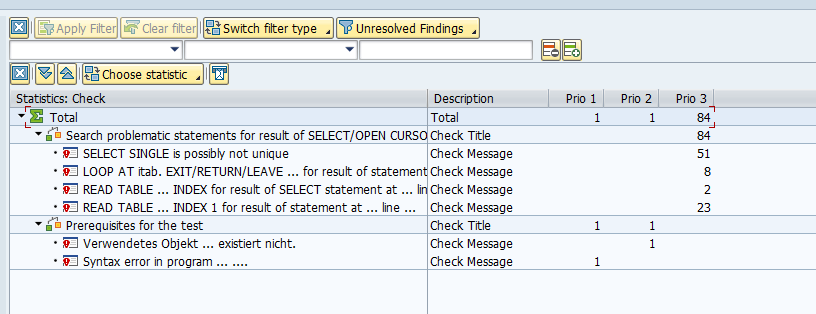
The ATC result screen will show, but list can be very long:

Both Z programs and user exits will be shown (starting with S or X).

Press the Statistics View button top right to get a better overview:

The result list is now sorted per security item:

Don't let yourself be impressed by high numbers of the first run. Most issues are in old code: consider clean up. Focus on the priority 1 and priority 2 first. Finetune result set for priority 3 to lower the numbers.

Now you can zoom in to the issue per item by clicking on the line:

The details show the issue: hard coded user name. Clicking on the underlined code name in column Object Name will zoom into the code point to fix:

In this case hard coded break for a user. Fix is easy: delete the line of code.

Remote analysis

It is possible to use ATC remote analysis (see blog) for CVA. The full setup is explained in this SAP online help link. See also OSS note 2232083 – ATC/CI: SAP NetWeaver Application Server add-on for code vulnerability analysis – remote check runs – installation.

Checking license usage

Run program RSLIN_SEC_LICENSE_SETUP to check license usage:

Or run this from transaction SLIN_ADMIN.

SAP reference material

Generic presentation on SAP CVA can be found on this link.

CVA FAQ: follow this link.

CVA full list of checks: follow this link.

CVA as part of CI/CD development pipeline: follow this link.

ABAP code security issues explained: follow this link.

Bug fix and improvement notes

Bug fix and improvement OSS notes: